Keograms
A keogram is a time-based visual summary of the sky created from a sequence of images taken over a period of time, typically a full night or day. It is generated by extracting a single vertical (or horizontal) line of pixels from each image—usually through the centre of the frame—and stacking those lines side-by-side in chronological order.
The result is an image where one axis represents time and the other axis represents position in the sky. This makes keograms particularly useful for showing how sky brightness, cloud cover, twilight, aurora, airglow, or other large-scale atmospheric features change over time.
In an Allsky context, keograms are commonly used to: - Visualise the transition from day to night and night to day
-
Identify periods of cloud cover or clearing
-
Detect aurora or airglow activity
-
Provide a compact overview of an entire night in a single image
Because a keogram condenses thousands of images into one continuous timeline, it is an efficient way to analyse long-term sky behaviour without inspecting individual frames.
Warning
-
Only images that are saved are included in a keogram, so if you don't save your daytime and/or nightime images, they won't be included.
-
Keograms only show what happens at the center of the image and will not display events on the East or West.
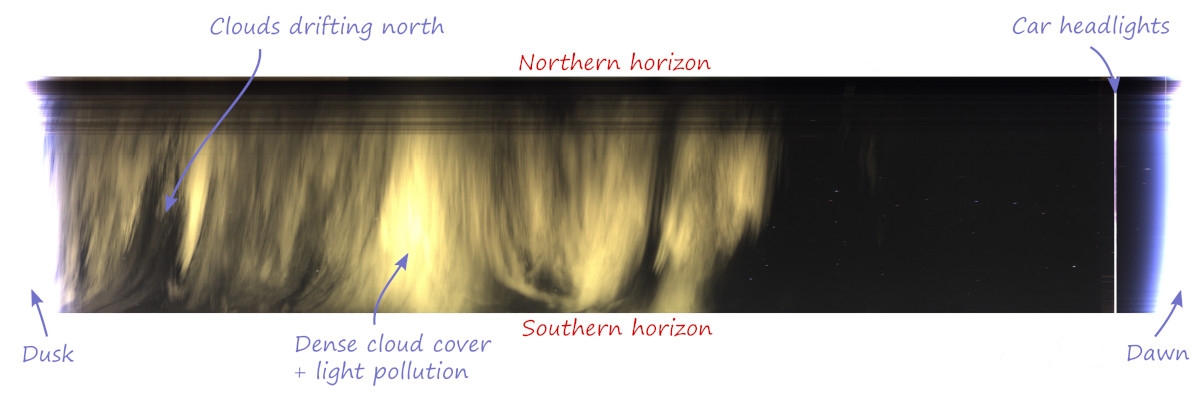
Example Keogram
Creating a keogram
You specify whether or not you want a keogram automatically created via the Generate setting in the Keograms sub-section of the WebUI. When enabled, a keogram will be created at the end of night and will contain information for the prior 24 hours.
The easiest way to create and optionally upload a keogram is via the generateForDay.sh command. For example, to create and then upload a keogram to any Allsky Website and/or remote server you have for July 10, 2025:
generateForDay.sh --keogram 20250710
generateForDay.sh --upload --keogram 20250710
This will use the settings specified in the Keograms sub-section of the WebUI.
If you want to experiment using other settings you can specify those settings as such:
generateForDay.sh --keogram --keogram-params "--font-color #ff0000" 20250710
This will create a keogram with a red timeline for July 10, 2025, overwriting any keogram that may already exist
Make sure the parameters are enclosed in quotes
See the Advanced section below for the possible parameters you can specify.
Advanced users: running the keogram program manually
generateForDay.sh calls the keogram program to actually create the keogram, passing it several arguments (the underlined ones below), plus any others you add to the Keogram Extra Parameters setting.
Executing the keogram program manually is possible, but not very useful. If run manually you need to specify at least the three required arguments.
Usage:  keogram -d <imagedir> -e <ext> -o <outputfile> [optional arguments]

Arguments:
-d | --directory <str> : directory from which to load images (required)
-e | --extension <str> : image extension to process (required)
-o | --output-file <str> : name of output file (required)
-r | --rotate <float> : number of degrees to rotate image, counterclockwise (0)
-s | --image-size <int>x<int> : only process images of a given size, eg. 1280x960
-h | --help : display this help message
-v | --verbose : Increase logging verbosity
-n | --no-label : Disable hour labels
-C | --font-color <str> : label font color, in HTML format (#0000ff)
-L | --font-line <int> : font line thickness (3)
-N | --font-name <str> : font name (simplex)
-S | --font-size <float> : font size (2.0)
-T | --font-type <int> : font line type (1)
-Q | --max-threads <int> : limit maximum number of processing threads. (use all cpus)
-q | --nice-level <int> : nice(2) level of processing threads (10)
-x | --image-expand : expand image to get the proportions of source - avoids tall and narrow images
-c | --channel-info : show channel infos - mean value of R/G/B
-f | --fixed-channel-number <int> : define number of channels 0=auto, 1=mono, 3=rgb (0=auto)

Font name is one of these OpenCV font names:
        Simplex, Plain, Duplex, Complex, Triplex, ComplexSmall, ScriptSimplex, ScriptComplex
Font Type is an OpenCV line type: 0=antialias, 1=8-connected, 2=4-connected
Example of running the keogram program manually:
cd ~/allsky/bin
./keogram -d images/20250710 -e jpg -o images/20250710/keogram/keogram.jpg --rotate 42 --font-size 2
Troubleshooting
Info
It is extremely rare that a keogram isn't created.
Warning
-
The resolution of all images must be identical; if not, only images with the same resolution as the FIRST image are used.
-
This can happen if the daytime and nighttime Binning settings are not the same, or any day you change the Image Resize and/or Image Crop settings.
-
If a keogram isn't being created, make sure the Keogram Generate setting is enabled. If that IS enabled, run:
generateForDay.sh --keogram DATEreplacing DATE with a valid date like 20250710 and check for errors.
-
If a keogram is created but not uploaded, make sure the Keogram Upload setting is enabled. If that IS enabled, run:
generateForDay.sh --upload --debug --keogram DATEand check for errors. If needed, run testUpload.sh to see why the upload fails.
-
If your keograms are tall and skinny you can have them created so they look like regular images by enabling the Expand setting.