Formatting Fields
All data within Allsky is stored in consistent internal formats, so for example ALL temeopratures are stored in Degreed Centigrade. Yo will therfore probably want to format data to improve its visual appearance, typicall formatting options are
- Changing Unit i.e. Degreed Centigrade to Degrees Farenhite
- Setting the number of decimal places
- Converting an internal format, i.e. decimal degrees to DDD MM SS
Each variable within Allsky has a default format but you can override this. To overide a variables format double click on the field containing the variable then click on the ? button at the end of the format field
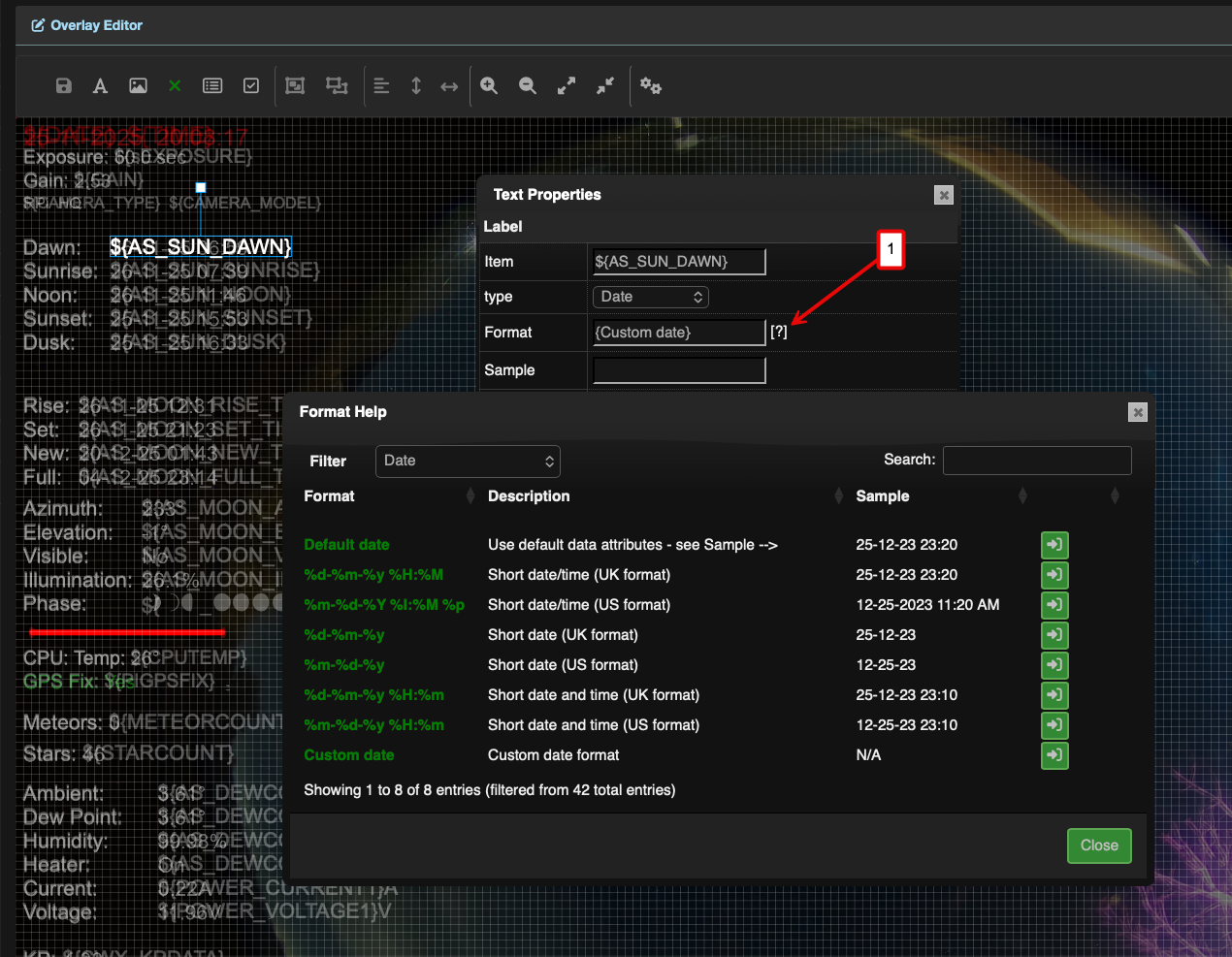
The Variable Format Dialog
In this example we have double clicked the 'AS-SUN_DAWN' field and then clicked on the ? (1). The resultignm dialog displays all of the formatting options available for the variable, in this case data formats.
Simply select the format you required and save the overlay.
Common Formats
NOTE: Some formats will display legacy formatting options. These mUST NOT be used for formatting fields and are present for backwards compatibility only
Please Note The lists below are not exhaustive and may change from release to release. Please refer to the Formatting Dialog for available options
Date Formats
This allows dates to be formatted in a number of ways. A custom date formatter is provided allowing you to format a date in any way you like
| Format | Description | Example |
|---|---|---|
| Default date | Use default data attributes - see Sample --> | 25-12-23 23:20 |
| %d-%m-%y %H:%M | Short date/time (UK format) | 25-12-23 23:20 |
| %m-%d-%Y %I:%M %p | Short date/time (US format) | 12-25-2023 11:20 AM |
| %d-%m-%y | Short date (UK format) | 25-12-23 |
| %m-%d-%y | Short date (US format) | 12-25-23 |
| %d-%m-%y %H:%m | Short date and time (UK format) | 25-12-23 23:10 |
| %m-%d-%y %H:%m | Short date and time (US format) | 12-25-23 23:10 |
| Custom date | Custom date format | N/A |
Number Formats
This allows numbers ot be formatted, setting decimal places etc
| Format | Description | Example |
|---|---|---|
| Custom number | Displays the number format dialog | N/A |
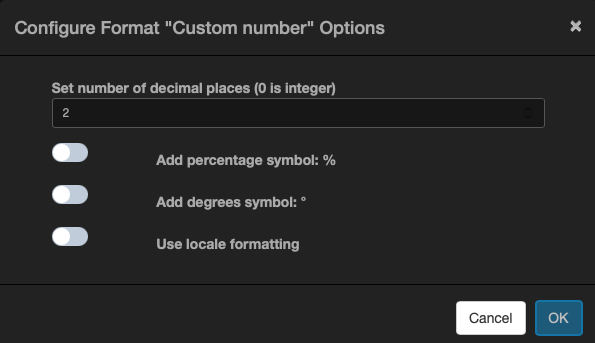
The Number Format Dialog
Boolean Formats
This allows boolean values to be displayed in a more Human Readable format
| Format | Description | Example |
|---|---|---|
| yesno | Output 'Yes' if input is 1, or 'No' | Yes, No |
| onoff | Output 'On' if input is 1, or 'Off' | On, Off |
| truefalse | Output 'True' if input is 1, of 'False' | True, False |
| num | Output '1' if input is 1, or '0' | 1, 0 |
Elevation Formats
This allows an elevation value to be displayed in a Human Readable format
| Format | Description | Example |
|---|---|---|
| Custom elevation | Elevation with decimal places and degree symbol | 52.12 ° |
Azimuth Formats
This allows an azimuth value to be displayed in a Human Readable format
| Format | Description | Example |
|---|---|---|
| Custom azimuth | Azimuth with decimal places and degree symbol | 52.12 |
| dms | Display azimuth with Degrees, Minutes, and Seconds | 123 |
Filesize Formats
This allows an filesize value to be displayed in a Human Readable format
| Format | Description | Example |
|---|---|---|
| Auto filesize | The most appropriate unit will be displayed (GB, etc.) | 12 GB |
| Custom filesize | Filesize with decimal places and units (GB, MB, etc.) | 12 TB |
Filesize Formats
This allows an filesize value to be displayed in a Human Readable format, converting between units if required
| Format | Description | Example |
|---|---|---|
| Default temperature | Use default temperature attributes - see Sample --> | 23.5° C |
| Custom temperature | Customize variable attributes | 23,54° C |
GPIO Formats
This allows the state of a GPIO pin to be displayed in a more Human Readable format
| Format | Description | Example |
|---|---|---|
| onoff | Show as On or Off | On |
| yesno | Show as Yes or No | Yes |
| truefalse | Show as True or False | False |
| num | Show as 1 or 0 | 0 |
String Formats
This allows strings to be formatted in a a variety of ways
| Format | Description | Example |
|---|---|---|
| none | No change to the string | N/A |
| upper | Convert string to UPPER CASE | HELLO, WORLD! |
| lower | Convert string to lower case | hello, world! |
| camel | Convert string to camelCase | hello, World! |
| capitalize | Capitalize the string | Hello, World! |
| sentence | Capitalize the string, removing leading and trailing spaces | Hello, World! |
Altitude Formats
This converts an altitude to a Flight level
| Format | Description | Example |
|---|---|---|
| flightlevel | Convert altitude in metres to flight level | FL020 |
Distance Formats
Converts distance between Units
| Format | Description |
|---|---|
| Allsky internal | Allsky internal distance (miles) |
| mtok | Miles to Kilometres |
| ktom | Kilometres to Miles |