ADSB
This module allows you to display information on Aircraft in your vicinity on overlays. It utilises a system called ADS-B or, Automatic Dependent Surveillance–Broadcast. There are two methods for obtaining the ADS-B data.
- Installing an ADS-B reception station at home
- Using an online API
ADS-B Overview
ADS-B is a modern surveillance technology used in aviation to determine and share the position of aircraft in real time. The system is called automatic because it transmits information continuously without pilot input, dependent because it relies on the aircraft’s onboard navigation system, and broadcast because the data is openly transmitted as a one-way signal that anyone with the right equipment can receive. At the heart of ADS-B is the aircraft’s ability to calculate its own position. Using GNSS satellite navigation—such as GPS, Galileo, or GLONASS—the aircraft’s avionics system determines its latitude, longitude, altitude, heading, ground speed, and vertical rate. This information is updated multiple times per second and is considered far more accurate than traditional radar measurements.
Once the aircraft has determined its position, it broadcasts this information over one of two frequencies. The most common is 1090 MHz, known as 1090ES (Extended Squitter), which is used globally and required for high-altitude and international operations. In the United States, a secondary system called 978 MHz UAT is available for general aviation flying below 18,000 feet. These ADS-B broadcasts are not encrypted or directional—they are simply radio messages radiating outward from the aircraft. Any receiver within line-of-sight can detect them, which includes other aircraft, ground stations, satellites, and even hobbyists at home.
Other aircraft equipped with ADS-B IN can directly receive these broadcasts. This enables pilots to see nearby traffic on cockpit displays with unprecedented accuracy, enhancing situational awareness and reducing the risk of mid-air collisions. This air-to-air capability is one of the most transformative aspects of ADS-B because it provides real-time traffic information independent of air traffic control or radar coverage. Many modern avionics systems integrate ADS-B IN with synthetic vision, terrain maps, and weather overlays to give pilots a much clearer picture of the environment around them.
On the ground, air traffic control stations operate specialized antennas that receive ADS-B broadcasts from aircraft within range. Unlike primary radar—which relies on bouncing radio waves off aircraft—ADS-B gives ATC precise, continuous position reports without the need for expensive radar equipment. This allows controllers to track aircraft more accurately, optimize airspace, and support more efficient routing. In areas with limited radar coverage, ADS-B dramatically improves visibility and safety.
In addition to ground receivers, ADS-B signals can be detected by satellites in low Earth orbit. These satellites carry sensitive radio receivers capable of listening to the 1090 MHz broadcast from space. Companies like Aireon operate constellations that provide global ADS-B coverage, including remote oceans and polar regions where radar and ground receivers cannot reach. This satellite-based ADS-B has revolutionized long-haul flight tracking and greatly improved emergency response and search-and-rescue operations.
A unique and democratic aspect of ADS-B is that the broadcast can also be received by anyone at home. A simple setup—a USB software-defined radio (RTL-SDR), a small 1090 MHz antenna, and decoding software such as dump1090 or readsb—allows enthusiasts to see the same real-time aircraft positions that ATC receives. Many popular flight-tracking websites, such as Flightradar24, ADSBexchange, RadarBox, and OpenSky Network, rely on thousands of these volunteer home receivers feeding data into their networks. Crowdsourcing ADS-B in this way creates rich, high-resolution global flight maps that would be impossible using only official infrastructure.
In summary, ADS-B is a highly accurate, globally scalable surveillance system where aircraft continuously broadcast their own positions. These broadcasts are received by other aircraft for traffic awareness, by ground stations for air traffic control, by satellites for global coverage, and by home hobbyists who contribute to online flight-tracking networks. This open, cooperative design has transformed modern aviation by making the skies more transparent, safer, and more efficiently managed.
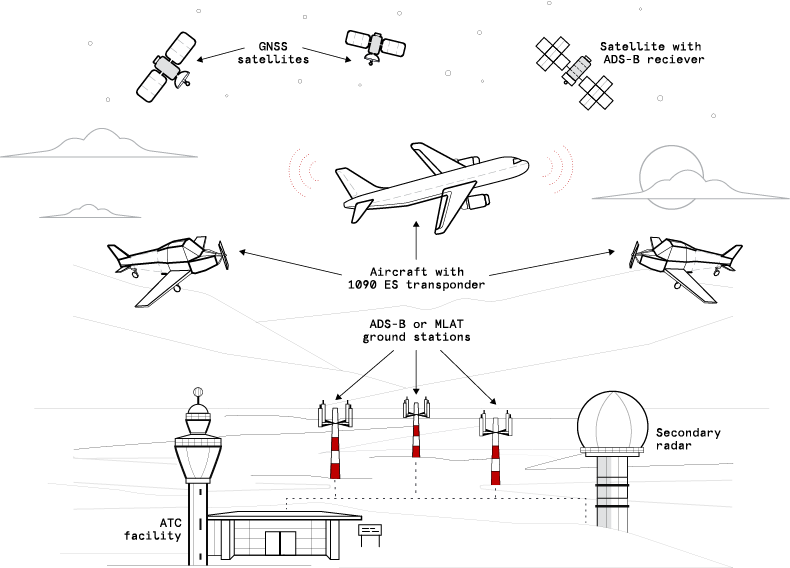
ADS-B Overview
Local Installation
Hardware
To setup a local installation requires additional hardware. At a bare minimum you will need
- Host computer, something like a pi3 or 4
- A SDR dongle, some dongles are specific to ads-b
- A 1090MHz antenna
Details on how-to set this up are beyond the scope of this document but there are a lot of resources available online to help, some examples
- FlightRadar24 Contributing to Flightradar24 will give you a 'Contributor Plan' with access to a lot of the paid features.
- ADS-B Exchange Contributing to ADS-B Exchange will remove all ads
- Plane Finder Contributing to Plane Finder will give you access to premium apps
- 360 Radar NOTE: UK Only Great for Military aircraft and they are working on a mode a system
- Open Sky
- Airplanes Live
- adsb.fi
- And many more ...
Contributing Data
If you are running a local ADS-B installation then most online services will provide you with some benefits if you contribute data. Contributing is easy and documented on the relevants services websites. We encourage people to contribute data if possible, it should be noted that you can contribute to multiple services at the same time.
Local Settings
To use a local installation select 'Local' from the data source dropdown
| Setting | Description |
|---|---|
| Local Address | The local address of your data |
To obtain this address find the ip address of your ads-b installation and use it in the following URL
http://<ADSB INSTALLATION IP>:8080/data/aircraft.json
Online API's
The module supports three online API's for accessing ADS-B data
OpenSky
The OpenSky Network is a non-profit association based in Switzerland. It aims at improving the security, reliability and efficiency of the air space usage by providing open access of real-world air traffic control data to the public. The OpenSky Network consists of a multitude of sensors connected to the Internet by volunteers, industrial supporters, and academic/governmental organizations. All collected raw data is archived in a large historical database. The database is primarily used by researchers from different areas to analyze and improve air traffic control technologies and processes.
Before using OpenSky you will need either a paid subscription or to be contributing data, see the Open Sky Website for details.
Settings
| Setting | Description |
|---|---|
| Client Id | The client ID from your account |
| Secret | The secret from your account |
| Min Latitude | The minimum latitude for the bounding box |
| Min Longitude | The minimum longitude for the bounding box |
| Max Latitude | The maximum latitude for the bounding box |
| Max Longitude | The maximum longitude for the bounding box |
Bounding Box
OpenSky requires that you provide a bounding box. Only aircraft within this box will be returned, the size of the box will also determine how many api credits are used for each request. To create the bounding box use a site like bbox finder
Distance Limit
OpenSky does not use the distance limit setting when requesting data. It will however use it once the data has been retreived. So for example if your distance limit is set to 50 miles but your bounding box is much bigger the API will return all aicraft withing the bounding box but the module will then filter this to only aircraft within 50 miles.
API Limits
API credits are used for all endpoints except /states/own. Credit usage is lower in general for restricted/smaller areas (/states/all) and shorter time frames (/flights and /tracks). For /states/all the credit calculation is done by square degrees. The area can be restricted by using the lamin, lamax, lomin, lomax query parameters. The area square deg column in the table below indicates the square degree limit - e.g. a box extending over latitude 10 degrees and longitude 5 degrees, would equal 50 square degrees:
Most unpaid accounts will start with 4000 credits
| Area square deg | Credits |
|---|---|
| 0 - 25 (<500x500km) | 1 |
| 25 - 100 (<1000x1000km) | 2 |
| 100 - 400 (<2000x2000km) | 3 |
| over 400 or all (>2000x2000km) | 4 |
AirplanesLive
Airplanes.Live is a website dedicated to aviation enthusiasts. It leverages enthusiast receivers to capture ADS-B (Automatic Dependent Surveillance-Broadcast) and MLAT (Multilateration) data, providing real-time information about aircraft in your area. Your unfiltered data allows enthusiasts, researchers, and journalists access to an incredible amount of data related to flight monitoring. Airplanes.Live displays all ADS-B and all Mode S equipped, calculated by MLAT, aircraft on a full featured tracking map with history and replay functions.
Settings
There are no specific settings for the Airplanes live API
API LImits
The Airplanes.live REST API is rate limited to 1 request per second.
adsb.fi
adsb.fi is a community-driven flight tracker, with over 4500 feeders around the world. We provide open and unfiltered access to worldwide air traffic data.
Settings
There are no specific settings for the adsb.fi API
API Limits
adsb.fi uses rate limiting to protect against abuse and misuse, and to help ensure everyone has fair access to the API. The public endpoints are rate limited to 1 request per second, and the feeder endpoint to 1 request every 30 seconds.
Settings
Aside from the data source the following settings are available on the settings tab
| Setting | Description |
|---|---|
| Aircraft Type Source | The data source for determining the aircraft type, see notes below |
| Get Flight Route | If enabled will use an external API to try and get the flight route for the aircraft |
| Limit Distance | For all datasources except Open Sky, limits the distance for aircraft |
| Altitude | The altitude of your station in metres |
| Read Every | Only access the API's every this number of seconds, this helps to reduce hitting rate limits on API's |
Aircraft Type Data Source
ADS-B does not provide an aircraft type in its data but it does provide a unique hex code for the aircraft. Contributors on the internet have built an database that maps these hex code to aicraft types. The module provides two different ways to get more detailed information about an aircraft
- Local. This uses a local database but be aware that this may not be uptodate and will contain incorrect data. Its fine for most purposes
- hexdb. This is an online service that contains much more uptodate information
Flight Routes
Flight routes are obtained from an online service. This service imposes rate limits which unless you live in a very busy area you are unlikely to hit
The Rate limits are calculated over a rolling 60 second time period.
| Rate | Block time (Seconds) |
|---|---|
| 512 + | 60 |
| 1024 + | 300 |
Overlay Data
For each aircraft the following data is available for use in overlays, (X) in the table below relates to the aircraft number. The aircraft are sorted with the first being the closest to your location
| Variable | Description |
|---|---|
| AS_DISTANCE_AIRCRAFT(X) | The distance of the aircraft from your station in miles |
| AS_HEX_AIRCRAFT(X) | The hex code of the aircraft |
| AS_AZIMUTH_AIRCRAFT(X) | The azimuth of the aircraft from your location |
| AS_ELEVATION_AIRCRAFT(X) | The elevation of the aircraft from your location |
| AS_ALTITUDE_AIRCRAFT(X) | The raw altitude of the aircraft |
| AS_TYPE_AIRCRAFT(X) | The aircraft type |
| AS_OWNER_AIRCRAFT(X) | The owner of the aircraft |
| AS_REGISTRATION_AIRCRAFT(X) | The registration of the aircraft |
| AS_MANUFACTURER_AIRCRAFT(X) | The aircraft manufacturer |
| AS_MILITARY_AIRCRAFT(X) | Flag to indicate if the aircraft is military |
| AS_TEXT_AIRCRAFT(X) | The flight number and azimuth of the aircraft |
| AS_LONGTEXT_AIRCRAFT(X) | The flight number, type, azimuth, distance, altitude and speed |
| AS_SHORT_ROUTE_AIRCRAFT(X) | Short route text of the aircraft ICAO -> ICAO |
| AS_MEDIUM_ROUTE_AIRCRAFT(X) | Medium route text of the aircraft CITY -> CITY |
| AS_LONG_ROUTE_AIRCRAFT(X) | Long route text of the aircraft (ICAO) AIRPORT -> (ICAO) Airport |
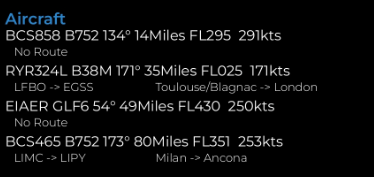
Example ADS-B data on an overlay
Blocks
Several blocks are provide to make adding data to the overlays easier. These can be access from the variable manager in the overlay editor
Charts
A chart and gauge showing the number of aircraft received are available. These can be found in the Chart Manager
Available in
-
Daytime
- The Day time pipeline
-
Nighttime
- The Night time pipeline
-
Periodic
- The Periodic pipeline