Fans
This module allows you to control fans based upon either the internal CPU temperature of the pi or from an external sensor configure in the environment module.
This can be useful for controlling a cpu cooler or venting air from the Allsky enclosure.
Settings
The following settings are available in the module
Fans 1 and 2 tabs
| Setting | Description |
|---|---|
| Sensor Type | Selects either 'internal', the CPU temp or 'Allsky' allowing another variable to be selected |
| Variable | Only available when 'Allsky' selected as the sensor type. Allows the variable containing the required temperature to be selected |
| Temp Limit | Above this temperature the fan will be activated |
| Read Every | How frequently to read the temperature, helps prevent fans starting and stopping too frequently |
| Output Pin | The GPIO pin the fan is connected to |
| Invert Output | Inverts the GPIO output i.e. low is considers 'on' |
| Use PWM | Use PWM to control the fan |
| PWM Min | Only available when 'Use PWM' selected. Sets the min temp for pwm i.e. duty cycle is 0% |
| PWM Max | Only available when 'Use PWM' selected. Sets the max temp for pwm i.e. duty cycle is 100% |
Data Control Tab
Deprecation Warning
Please do not use the values on this tab. They will be removed shortly
| Setting | Description |
|---|---|
| Custom Expiry | Enable cutom expiry |
| Data Age | How long the data is valid for |
Schematics
5v Fans and Relays
Whilst it is possible to drive a 5v PWM fan directly from the gpio pins it is not recommended. Equally it is not recommended to control fans via relays
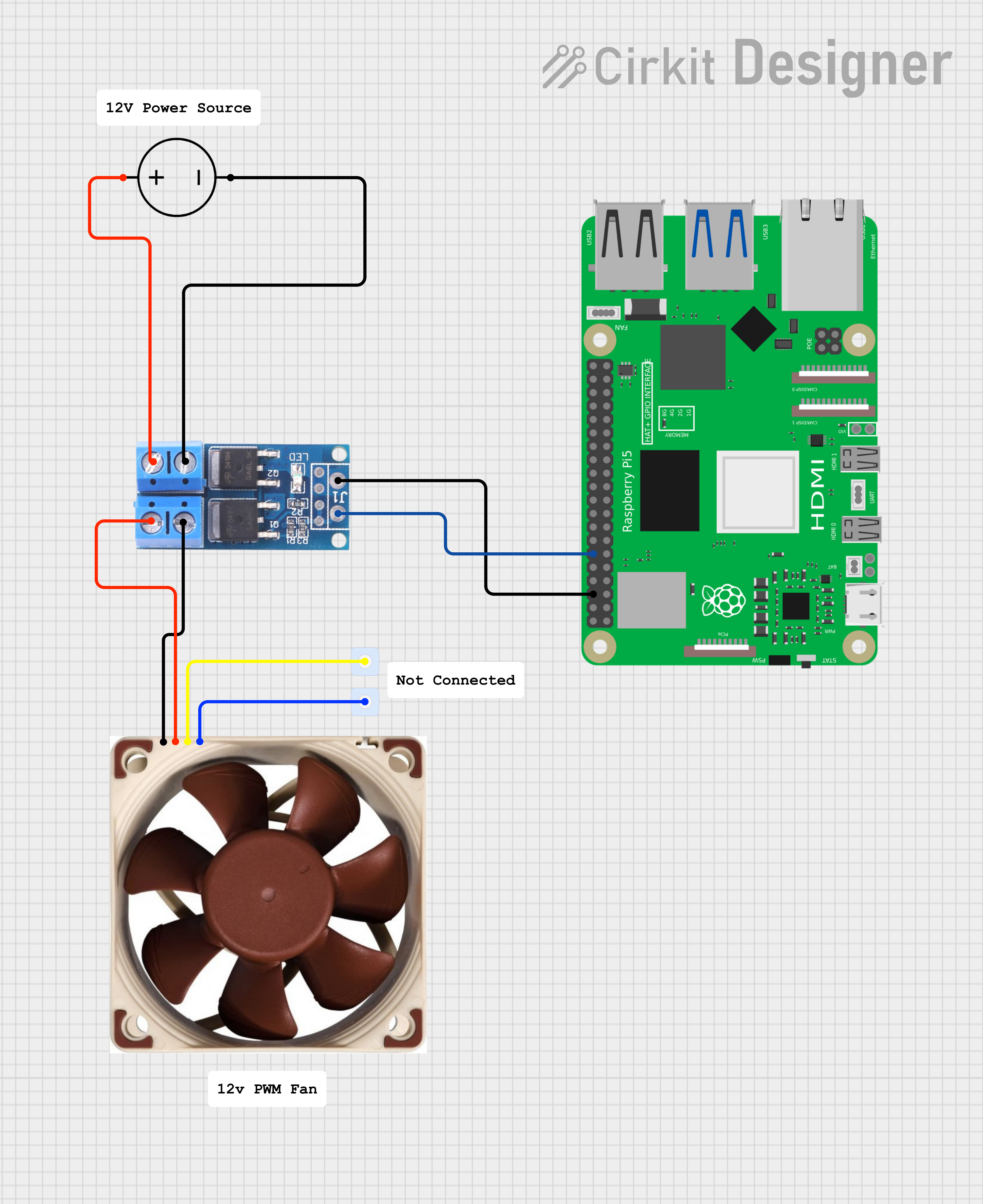
Example Mosfet driven 12 Fan
Available in
-
Daytime
- The Day time pipeline
-
Nighttime
- The Night time pipeline
-
Periodic
- The Periodic pipeline